
Model and serial plates on JennAir built-ins hide behind panels and toe-kicks. Knowing where to look saves time on every service call and parts order.
Independent repair starts with accurate identification—JennAir built-ins share aesthetics across generations but not identical parts behind the same door style.
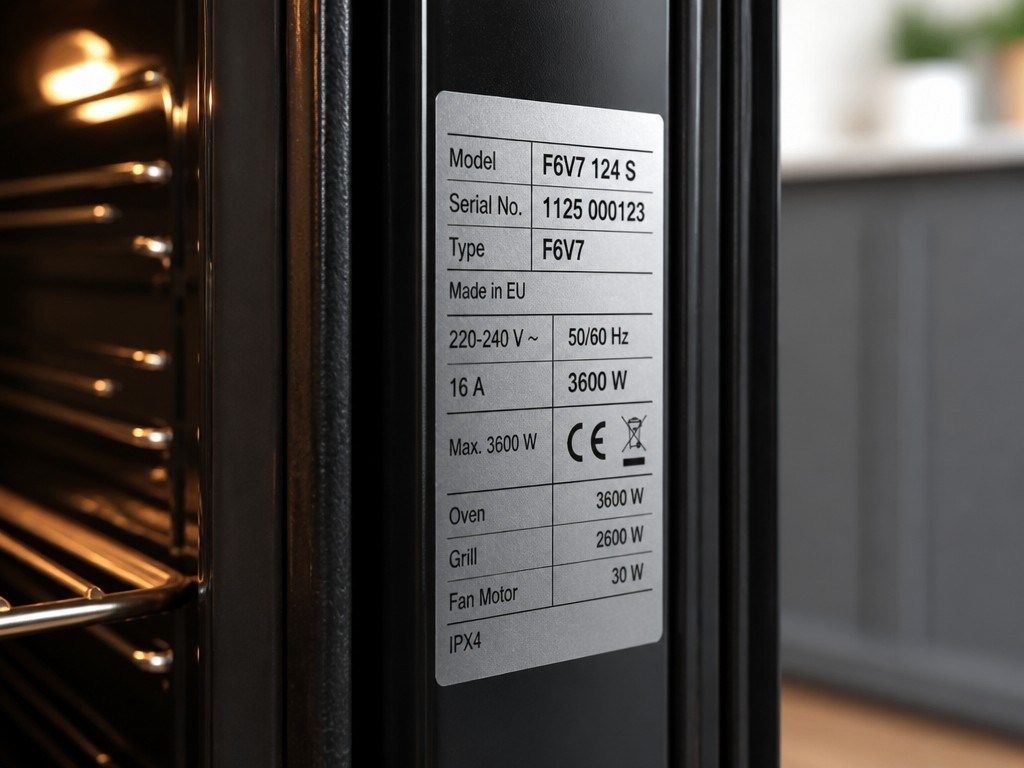
Photograph the rating plate before calling for service. A clear model number beats a kitchen description every time.
Column refrigerators often place the plate on the inner left or right wall behind fresh-food shelving, or on the ceiling of the cavity—visible with doors open.
Wall ovens and warming drawers frequently mount plates on the door frame edge or inner door lip, readable when the door is open wide.
Dishwashers and compactors tuck plates on the tub edge visible when the door or drawer opens; some require removing the lower rack or toe-kick for a duplicate label.
| Appliance | Common plate location | Tip |
|---|---|---|
| Column refrigerator | Inner side wall or ceiling | Use phone flash; avoid removing panels |
| Wall oven / microwave | Door frame or trim edge | Open fully; check both cavities on doubles |
| Rangetop / cooktop | Under burner box via service area | Owner view limited—photo if visible |
You do not need to remove appliance panels or move built-in columns to read primary plates in most cases—door-open locations suffice.
If a plate is worn, check purchase documents or builder spec sheets as secondary sources.
Safe to try
Leave to a technician
Steam and cleaners fade labels over years—a flashlight and angled phone shot sometimes recover embossed characters.
Remodels with reused appliances may lack paperwork; service can sometimes decode from partial serial via manufacturer databases during visits.
Upper and lower ovens may share one outward appearance but carry distinct model suffixes—photograph both if two plates exist.
Model numbers determine wiring diagrams, error code charts, and parts compatibility—especially critical across JennAir luxury lines with overlapping visuals.
We may verify plate data against unit configuration on site when labels are damaged.
Thirty seconds with a camera inside the door saves hours later. Locate the plate once, store the photo, and every future repair conversation starts ahead of the game.
This article covers Finding The Model And with practical checks you can run before booking a technician.
Official manuals and support notes are available on JennAir owner support.
Remember: Finding The Model And is easier to resolve when you capture the model number and when Finding The Model And first appeared.
Write down the full model number before ordering parts. Board and sensor revisions can change which part number is correct.
A single power reset can clear a temporary fault, but repeated returns of the same code usually mean a physical cause remains.
Keep vents and filters clear between visits. Restricted airflow often mimics electrical or sensor failures.
If water, burning smells, or sparking are present, stop using the appliance and arrange a professional inspection.
Helpful but not always mandatory—model strongly preferred.
Panels hide exteriors; interior plates remain accessible.
If you still have install packaging—yes; otherwise use on-unit plate.
Only if they match installed unit—verify on appliance.
Built-in JennAir replacements involve cabinetry, panels, and plumbing—not just box swaps. Repair often wins when the suite and finishes still have years…
Continue readingLuxury JennAir kitchens reward a calm maintenance rhythm—filters, seals, and ventilation—more than emergency heroics when guests are due.
Continue readingJennAir kitchens mix exposed stainless with panel-ready fronts. The wrong cleaner on either surface leaves permanent shadows in a room built to…
Continue readingShare a few details and we’ll confirm an appointment. Prefer to talk? Call us and we’ll help right away.